Engineering High-Performance Web Applications: From Sub-Second TTFB to 100/100 Core Web Vitals
A deep architectural guide to shipping sub-second web experiences: edge caching strategies, PHP OPcache tuning, N+1 query elimination, asset bundle hygiene, and Core Web Vitals optimization.

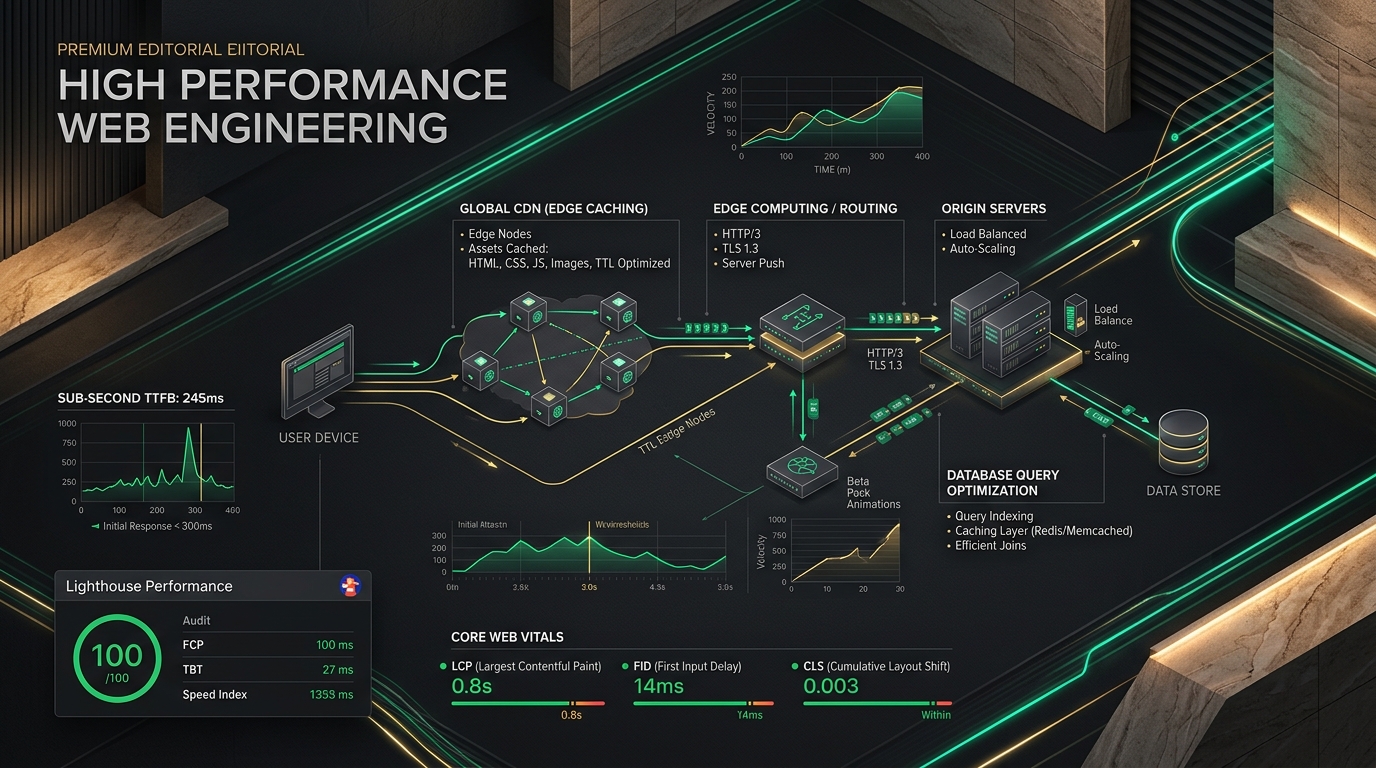
Engineering High-Performance Web Applications: From Sub-Second TTFB to 100/100 Core Web Vitals
Speed is not a cosmetic feature or an afterthought; it is a fundamental pillar of business conversion, search rankings, and system resilience.
Every 100-millisecond delay in page load time cuts e-commerce conversion rates by up to 7%. Furthermore, Google’s search ranking algorithms directly penalize web properties failing Core Web Vitals—specifically Largest Contentful Paint (LCP), Interaction to Next Paint (INP), and Cumulative Layout Shift (CLS).
Achieving sub-second response times across global networks requires a cohesive, full-stack performance strategy: from server-level byte delivery and database index geometry to edge caching and asset bundle hygiene.
Here is the exact architectural playbook for engineering sub-second web applications in production.
1. The Performance Metric Hierarchy
Performance optimization begins with measuring the right signals. Traditional page load metrics (like total window.onload time) are misleading because they don't reflect when the page became visually complete or interactive for real users.
Modern web performance is governed by three primary thresholds:
| Metric | Target | What It Measures | Primary Optimization Lever |
|---|---|---|---|
| TTFB (Time to First Byte) | < 200ms | Origin latency + network roundtrip | Edge caching, OPcache, Redis, DB indexing |
| LCP (Largest Contentful Paint) | < 1.2s | When the main content is rendered | Image compression (AVIF), preloading, critical CSS |
| INP (Interaction to Next Paint) | < 100ms | Responsiveness to user input | Minimized JS main-thread execution |
| CLS (Cumulative Layout Shift) | < 0.05 | Visual layout stability | Explicit image dimensions, font display swaps |
2. Infrastructure & Edge Delivery: Slashing TTFB
No matter how fast your backend framework compiles, network latency across oceans will destroy user experience if requests must cross continents to an origin server on every click.
Edge Caching with Stale-While-Revalidate
Static assets and public web pages should be terminated at the CDN edge (Cloudflare, Fastly, or CloudFront) closest to the end user.
Configure your origin server (Nginx/Caddy) to broadcast intelligent HTTP caching headers:
# Nginx Asset Caching
location ~* \.(css|js|woff2|avif|webp|png|jpg|ico)$ {
    expires 1y;
    add_header Cache-Control "public, max-age=31536000, immutable";
    add_header Access-Control-Allow-Origin "*";
    access_log off;
}

# Dynamic HTML with Micro-caching / Edge Purging
location / {
    add_header Cache-Control "public, max-age=60, s-maxage=3600, stale-while-revalidate=86400";
}
Enable Modern Wire Protocols: HTTP/3 & Brotli
- HTTP/3 (QUIC): Eliminates head-of-line blocking over lossy mobile connections using UDP multiplexing.
- Brotli Compression (
br): Produces file sizes 20% to 30% smaller than legacy Gzip for text assets (HTML, SVG, CSS, JavaScript).
# Verify Brotli compression on your domain
curl -IL -H "Accept-Encoding: br" https://your-domain.com
3. Origin Server & PHP-FPM Optimization
When dynamic requests must hit the PHP runtime, your application must execute in tens of milliseconds—not hundreds.
Production OPcache Configuration (/etc/php/8.4/fpm/conf.d/10-opcache.ini)
OPcache eliminates PHP's compilation step by storing precompiled script bytecode in shared memory:
[opcache]
opcache.enable=1
opcache.enable_cli=1
opcache.memory_consumption=256
opcache.interned_strings_buffer=32
opcache.max_accelerated_files=20000
opcache.validate_timestamps=0 ; Never re-check file timestamps in production (atomic deploys reload FPM)
opcache.save_comments=1
opcache.fast_shutdown=1
opcache.jit=tracing
opcache.jit_buffer_size=64M
Deployment Rule: When
opcache.validate_timestamps=0is enabled, zero disk I/O is wasted verifying if.phpfiles have changed. Your zero-downtime deployment script must issue a graceful reload (systemctl reload php8.4-fpm) on every release.
4. Database Query Optimization: Killing the N+1 Problem
The database is almost always the true bottleneck in dynamic applications. A single un-indexed query or hidden Eloquent N+1 loop will bring high-concurrency servers to their knees.
1. Eager Loading Relationships
Never access child relationships in a loop without eager loading:
// ❌ SLOW: 1 query for 50 posts + 50 queries for authors (51 total queries)
$posts = Post::latest()->take(50)->get();
foreach ($posts as $post) {
    echo $post->author->name;
}

// ✅ FAST: 2 total queries regardless of post count
$posts = Post::with(['author:id,name,avatar'])
    ->latest()
    ->take(50)
    ->get();
2. Composite Database Indexing
Indexes must mirror your WHERE and ORDER BY query patterns. Single-column indexes are frequently inadequate:
// Migration: Compound Index for fast filtered sorting
Schema::table('orders', function (Blueprint $table) {
    $table->index(['status', 'created_at'], 'idx_orders_status_created');
});
3. Cursor Pagination Over Offset Pagination
Traditional ->paginate(20) issues OFFSET 20000 LIMIT 20, forcing the database engine to scan 20,020 records before discarding the first 20,000.
For large datasets, use Cursor Pagination, which uses a fixed comparison against the indexed primary key:
// Millions of rows scanned in < 1ms
$orders = Order::orderByDesc('id')->cursorPaginate(25);
5. Front-End Asset Hygiene & Core Web Vitals
Even with a 50ms TTFB, your site will feel sluggish if the browser spends 3 seconds downloading blocking CSS and executing heavy JavaScript bundles.
1. Eliminating LCP Delays on Hero Images
The Largest Contentful Paint is usually your hero image or primary banner.
- Preload Critical Images: Tell the browser to start fetching the hero asset immediately while parsing HTML
<head>:
<link rel="preload" as="image" href="/images/hero-banner.webp" type="image/webp" fetchpriority="high">
- Modern Formats: Convert all raster images to WebP or AVIF. A 1.4MB JPEG consistently compresses down to 95KB in modern AVIF without visible artifacts.
- Never Lazy-Load the Hero Image: Applying
loading="lazy"to above-the-fold content delays its render by hundreds of milliseconds. Reserveloading="lazy"strictly for off-screen images.
2. Eliminating Cumulative Layout Shift (CLS)
Layout shifts occur when images or embeds load without pre-reserved aspect ratios, jarringly shifting page content down.
Always declare explicit width and height attributes or CSS aspect ratios:
<!-- Explicit dimensions reserve layout space before byte download -->
<img src="/images/project-thumb.webp"
     width="800"
     height="450"
     alt="Case Study"
     class="w-full h-auto aspect-video object-cover">
3. Modern Font Loading Strategies
Prevent Invisible Text (FOIT) while custom web fonts download:
@font-face {
    font-family: 'Space Grotesk';
    src: url('/fonts/space-grotesk.woff2') format('woff2');
    font-display: swap; /* Immediately renders system fallback, then smoothly swaps */
}
6. The High-Performance Engineering Checklist
Before pushing any production release, audit your application against this baseline:
- Lighthouse Target: Continuous audit score of 95+ on Mobile and 100 on Desktop.
- Asset Minification: Vite or Webpack bundle splitting with tree-shaking enabled.
- Query Profiling: Laravel Debugbar / Telescope confirms zero duplicate or N+1 queries.
- Strict Gzip/Brotli: Verified text compression on all CSS, JS, and JSON payloads.
- Redis Object Caching: High-read database queries cached with atomic cache tags.
- Asynchronous Processing: Heavy tasks (emails, webhooks, analytics logging) deferred to background Redis workers.
Conclusion
High-performance web architecture is not achieved by applying a single quick-fix plugin. It is the cumulative discipline of optimizing every layer of the stack: shaving 50ms off origin database execution, cutting 150KB of unused client JavaScript, and serving immutable assets directly from edge POPs.
When engineered with intention, your web platform delivers instantaneous, sub-second responses that delight users and drive real business growth.