Scaling Laravel Applications with Queues, Jobs, and Task Scheduling
Learn how to build resilient, high-throughput Laravel applications using Redis queues, idempotent background jobs, failure-tolerant retries, and high-precision task scheduling.

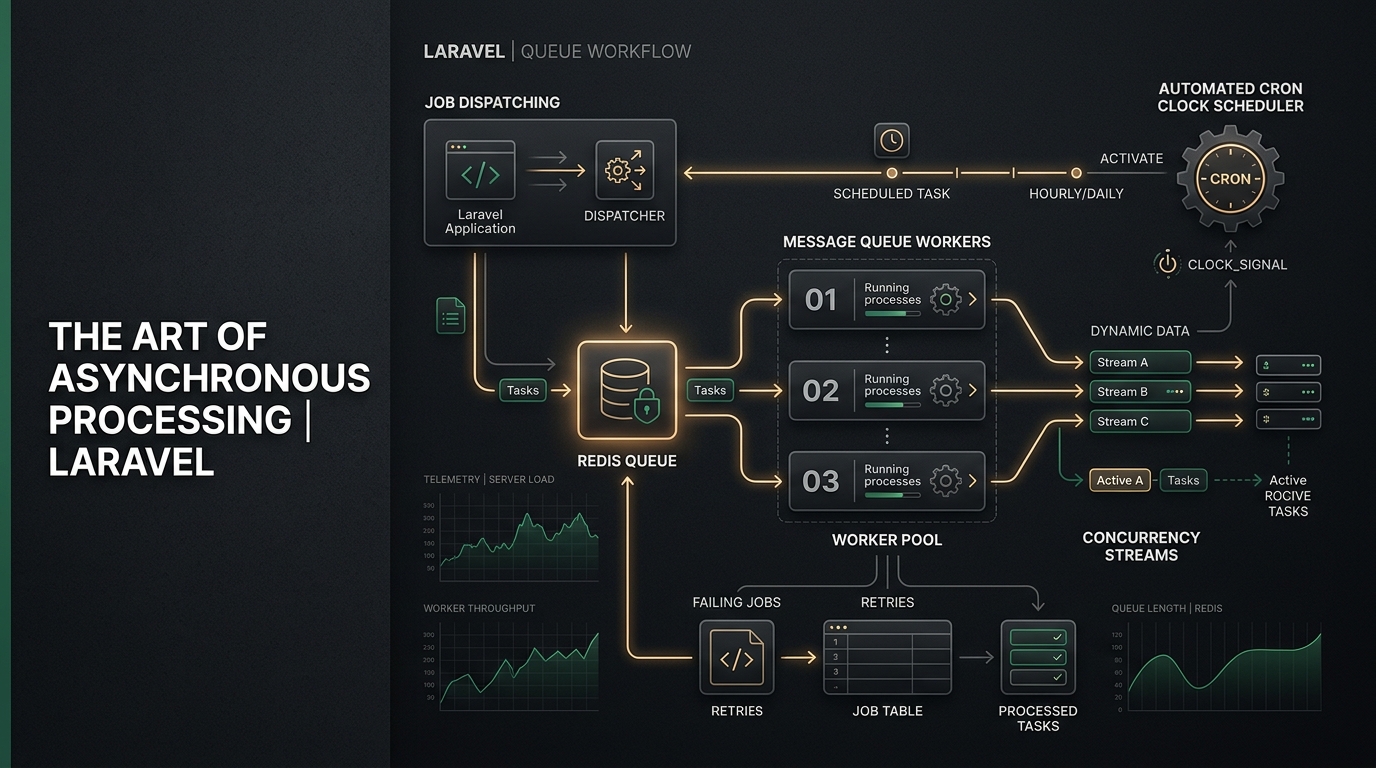
Scaling Laravel Applications with Queues, Jobs, and Task Scheduling
In a traditional synchronous HTTP cycle, your web server halts and waits for every instruction to finish before delivering a response to the client. If a user registers and your application sends a welcome email, generates a PDF receipt, triggers an external CRM webhook, and parses image metadata synchronously, that single HTTP request will take 3 to 6 seconds to resolve.
Under high traffic or during third-party API outages, synchronous blocking cascades into request queue congestion, pool exhaustion in PHP-FPM, and eventual 504 Gateway Timeouts.
Asynchronous architecture decodes this bottleneck. By offloading resource-intensive work to background queues and delegating recurring system operations to a centralized task scheduler, your web application maintains sub-100ms response times regardless of background workload.
Here is the architectural blueprint for designing, running, and monitoring high-concurrency background processing in Laravel.
1. Choosing the Right Queue Driver
Laravel ships with support for multiple queue backends via config/queue.php:
| Driver | Use Case | Latency | Concurrency Capability |
|---|---|---|---|
sync |
Local debugging only | None (Blocks HTTP) | Zero (Runs in request thread) |
database |
Small applications (< 50 jobs/min) | 50ms – 250ms | Low (Causes DB lock contention) |
redis |
Production standard (Recommended) | < 2ms | Extreme (In-memory, non-blocking) |
sqs |
Distributed multi-cloud infrastructure | 20ms – 60ms | High (Managed AWS infrastructure) |
Production Recommendation: For any production application handling payments, webhooks, or transactional messaging, Redis paired with Laravel Horizon is the industry benchmark. It provides atomic job pops, memory-speed queue latency, and real-time operational telemetry.
# .env
QUEUE_CONNECTION=redis
REDIS_CLIENT=phpredis
REDIS_HOST=127.0.0.1
REDIS_PASSWORD=null
REDIS_PORT=6379
2. Writing Production-Ready Jobs
Generating a job in Laravel is as simple as running:
php artisan make:job ProcessOrderPayment --no-interaction
In production, however, a reliable job requires strict configuration for timeouts, retries, exponential backoffs, and idempotency.
Production Job Blueprint
<?php

namespace App\Jobs;

use App\Models\Order;
use App\Services\PaymentGatewayService;
use Illuminate\Bus\Queueable;
use Illuminate\Contracts\Queue\ShouldBeUnique;
use Illuminate\Contracts\Queue\ShouldQueue;
use Illuminate\Foundation\Bus\Dispatchable;
use Illuminate\Queue\InteractsWithQueue;
use Illuminate\Queue\SerializesModels;
use Illuminate\Support\Facades\Log;
use Throwable;

class ProcessOrderPayment implements ShouldQueue, ShouldBeUnique
{
    use Dispatchable, InteractsWithQueue, Queueable, SerializesModels;

    /**
     * Maximum number of attempts before moving to failed_jobs table.
     */
    public int $tries = 4;

    /**
     * Maximum execution time (in seconds) before worker terminates the job.
     */
    public int $timeout = 60;

    /**
     * Prevent job overlap for 2 minutes while processing.
     */
    public int $uniqueFor = 120;

    /**
     * Unique identifier to ensure duplicate orders are not queued concurrently.
     */
    public function uniqueId(): string
    {
        return (string) $this->order->id;
    }

    /**
     * Exponential retry backoff strategy (10s, 30s, 90s, 300s).
     */
    public function backoff(): array
    {
        return [10, 30, 90, 300];
    }

    public function __construct(
        public Order $order
    ) {}

    public function handle(PaymentGatewayService $gateway): void
    {
        // 1. Guard against stale model state or already settled orders
        if ($this->order->isSettled()) {
            Log::info("Skipping settlement for order #{$this->order->id}: already settled.");
            return;
        }

        // 2. Execute external communication
        $receipt = $gateway->charge($this->order);

        // 3. Update database state
        $this->order->markAsSettled($receipt->reference);
    }

    /**
     * Clean-up action when all retries are exhausted.
     */
    public function failed(?Throwable $exception): void
    {
        Log::critical("Payment settlement permanently failed for Order #{$this->order->id}", [
            'error' => $exception?->getMessage(),
            'order_id' => $this->order->id,
        ]);

        $this->order->markAsFailed();
    }
}
Key Engineering Rules for Jobs:
- Never pass heavy objects into
__construct(): Pass Eloquent models or primitive IDs. TheSerializesModelstrait stores only the model class and primary key, re-hydrating the fresh record from the database when the worker handles the job. - Design for Idempotency: Any job could be executed twice due to network timeouts or queue worker restarts. Always verify whether the underlying action has already been completed before executing side effects.
- Use Exponential Backoff: Never hammer external APIs immediately on failure. Use progressive backoffs (e.g.,
[10, 30, 90]) to give upstream services recovery windows.
3. Advanced Job Orchestration: Chains & Batches
Real-world workflows frequently consist of multiple interdependent steps. Laravel provides native primitives for declarative orchestration.
Sequential Chaining (Bus::chain)
When Job B depends strictly on the successful completion of Job A:
use App\Jobs\ProvisionServerDatabase;
use App\Jobs\InstallSslCertificate;
use App\Jobs\NotifyClientOfReadiness;
use Illuminate\Support\Facades\Bus;

Bus::chain([
    new ProvisionServerDatabase($tenant),
    new InstallSslCertificate($tenant),
    new NotifyClientOfReadiness($tenant),
])->catch(function (Throwable $e) use ($tenant) {
    Log::error("Tenant provisioning pipeline failed for {$tenant->id}: " . $e->getMessage());
})->dispatch();
Parallel Batching (Bus::batch)
When processing 5,000 invoices concurrently with completion callbacks and progress tracking:
use App\Jobs\GenerateMonthlyInvoice;
use Illuminate\Bus\Batch;
use Illuminate\Support\Facades\Bus;
use Throwable;

$batch = Bus::batch(
    $clients->map(fn ($client) => new GenerateMonthlyInvoice($client))
)->then(function (Batch $batch) {
    // Fired once all jobs succeed
    Log::info("Generated {$batch->totalJobs} invoices successfully.");
})->catch(function (Batch $batch, Throwable $e) {
    // First job failure triggers this hook
    Log::error("Invoice batch failed: " . $e->getMessage());
})->finally(function (Batch $batch) {
    // Executed regardless of failure or success
})->dispatch();
4. Modern Task Scheduling in Laravel
Rather than littering your production Linux server with 15 individual crontab lines, Laravel centralizes all scheduled tasks in your application code.
On your server, only one single cron entry is installed:
* * * * * cd /var/www/your-domain.com && php artisan schedule:run >> /dev/null 2>&1
Declarative Schedule Definitions
In Laravel 11 and 12, scheduled tasks are defined cleanly in routes/console.php:
<?php

use App\Jobs\PruneExpiredSessions;
use App\Jobs\ReconcileMpesaTransactions;
use Illuminate\Support\Facades\Schedule;

// 1. Critical payment reconciliation running every 10 minutes
Schedule::job(new ReconcileMpesaTransactions())
    ->everyTenMinutes()
    ->withoutOverlapping(15) // Mutex lock expires in 15 mins if worker crashes
    ->runInBackground();

// 2. Nightly database backup at 02:00 UTC
Schedule::command('backup:run --only-db')
    ->dailyAt('02:00')
    ->onOneServer() // Prevents duplicate execution in multi-server environments
    ->emailOutputOnFailure('devops@your-domain.com');

// 3. Weekly metrics aggregation report
Schedule::job(new PruneExpiredSessions())
    ->weeklyOn(1, '04:00')
    ->evenInMaintenanceMode();
Vital Scheduling Modifiers:
withoutOverlapping(expiresAt): Uses Redis or database cache locks to guarantee that if a scheduled task takes 75 seconds, the subsequent minute's invocation will not run concurrently.onOneServer(): Essential for high-availability setups where multiple web/worker nodes share the same Redis cache. Only a single server acquires the lock to trigger the scheduled job.runInBackground(): Spawns the task in an asynchronous sub-process so a slow scheduled command does not delay subsequent scheduled items.
5. Production Worker Management: Supervisor & Systemd
Queue workers run as continuous, long-lived PHP processes in memory. Unlike standard HTTP requests where PHP boots up and tears down on every hit, queue workers stay alive.
To ensure your workers survive reboots, memory limits, and crashes, you must monitor them with Supervisor or Systemd.
Production Supervisor Configuration (/etc/supervisor/conf.d/laravel-worker.conf)
[program:laravel-worker]
process_name=%(program_name)s_%(process_num)02d
command=php /var/www/your-domain.com/artisan queue:work redis --sleep=3 --tries=3 --max-time=3600 --max-jobs=1000 --memory=256
autostart=true
autorestart=true
user=www-data
numprocs=4
redirect_stderr=true
stdout_logfile=/var/www/your-domain.com/storage/logs/worker.log
stopwaitsecs=3600
Vital Deployment Hook:
Whenever you deploy new code, you must restart your queue workers, or they will continue executing the cached old code in memory:
php artisan queue:restart
6. Architecture Checklist for Production Uptime
- Queue Memory Leaks: Long-lived PHP workers accumulate memory over thousands of cycles. Pass
--max-jobs=1000or--max-time=3600so workers cleanly terminate and restart before leaking. - Database Disconnections: Ensure your database configuration handles worker timeouts cleanly by keeping connection timeouts longer than job runtimes.
- Horizon Alerts: Configure Slack or email webhooks in
config/horizon.phpto immediately notify the engineering team when queue wait times exceed 30 seconds. - Failed Jobs Pruning: Set up
Schedule::command('queue:prune-failed --hours=72')->daily()to prevent thefailed_jobstable from ballooning over time.
Conclusion
Leveraging Laravel's queue and schedule subsystem transforms your web application from a fragile synchronous script into a resilient, enterprise-grade distributed processing machine. Offloading workload guarantees uninterrupted user journeys, maximizes database throughput, and ensures your application can scale horizontally under peak load.