Building Modern Apps with Laravel, Inertia, and Vue.js: Best Practices
A practical guide to combining Laravel, Inertia.js, and Vue 3 — covering project setup, form handling, shared data, partial reloads, security, and testing patterns for building modern apps without a separate API layer
Building Modern Apps with Laravel, Inertia, and Vue.js: Best Practices
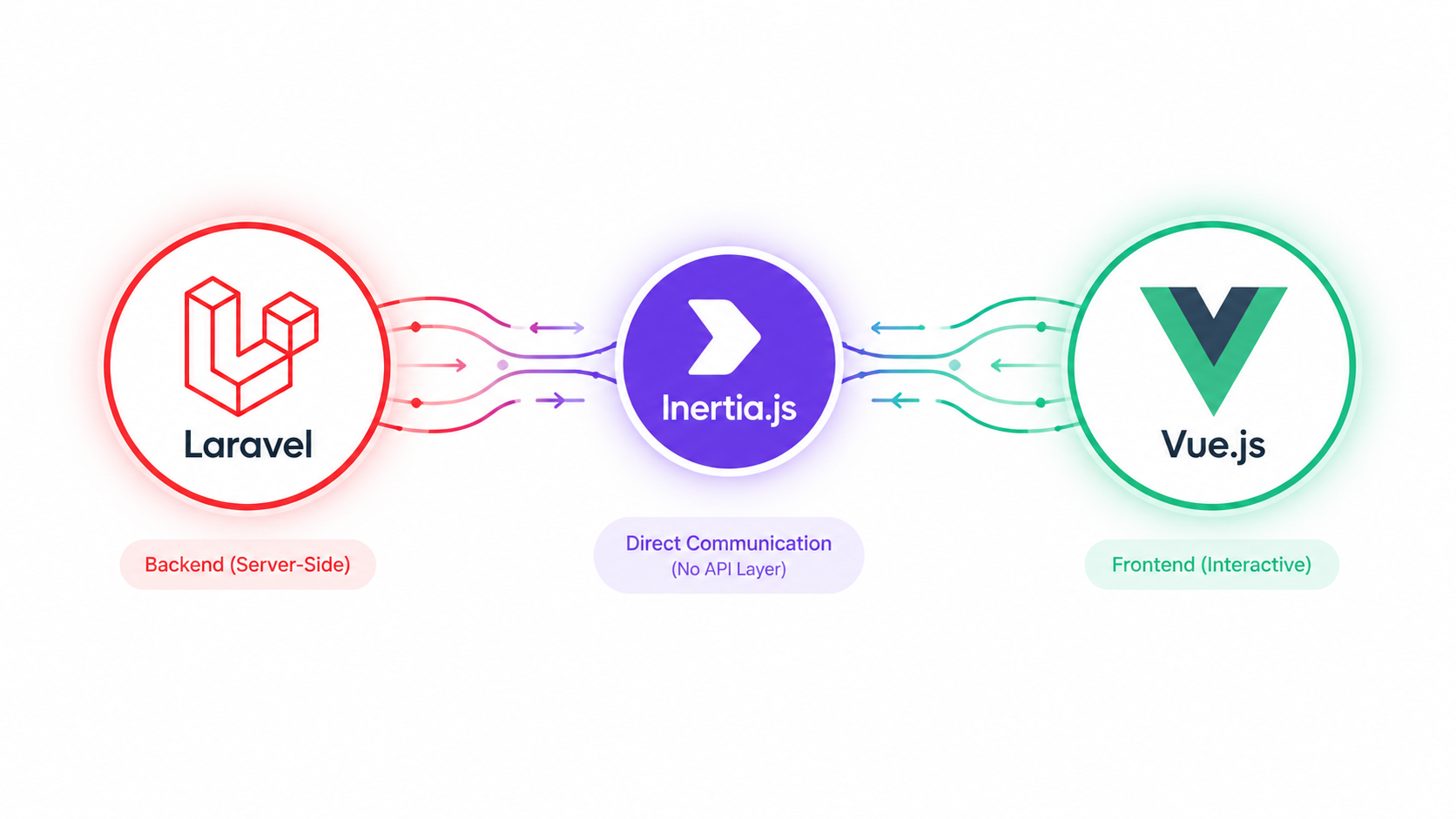
Laravel gives you a clean, batteries-included backend. Vue gives you a reactive, component-based frontend. The problem has always been the glue between them — do you build a separate SPA with a REST/GraphQL API and duplicate your routing, auth, and validation logic on both sides? Or do you accept the complexity tax of maintaining two codebases just to get a modern frontend? Inertia.js exists to remove that trade-off entirely: you get server-side routing and controllers exactly like a traditional Laravel app, but pages render as Vue components with full client-side interactivity — no API layer required. This guide covers how to structure, secure, and scale a Laravel + Inertia + Vue application properly.
Why Inertia Instead of a Separate SPA or API
A traditional decoupled SPA setup means:
- Duplicating validation rules (once in Laravel, once in the frontend)
- Building and versioning a full REST or GraphQL API just to serve your own frontend
- Managing CORS, token-based auth, and API-specific concerns for a UI that only your own app consumes
- Two separate deployments, two separate release cycles
Inertia removes almost all of this by keeping Laravel as the router and controller layer, while Vue handles rendering. Your controllers return Inertia responses instead of Blade views or JSON:
// Traditional Blade
return view('users.index', ['users' => $users]);

// Inertia
return Inertia::render('Users/Index', ['users' => $users]);
The frontend receives this as a Vue component with users as a prop — no separate API endpoint needed, no client-side router duplicating what Laravel's routes already do.
1. Project Setup
composer create-project laravel/laravel my-app
cd my-app
composer require inertiajs/inertia-laravel
php artisan inertia:middleware
Register the middleware in bootstrap/app.php (Laravel 11+) or app/Http/Kernel.php (Laravel 10):
use App\Http\Middleware\HandleInertiaRequests;

$middleware->web(append: [
    HandleInertiaRequests::class,
]);
Install the frontend dependencies:
npm install @inertiajs/vue3 vue@latest
npm install -D @vitejs/plugin-vue
Configure Vite (vite.config.js):
import { defineConfig } from 'vite';
import laravel from 'laravel-vite-plugin';
import vue from '@vitejs/plugin-vue';

export default defineConfig({
    plugins: [
        laravel({
            input: ['resources/css/app.css', 'resources/js/app.js'],
            refresh: true,
        }),
        vue({
            template: {
                transformAssetUrls: {
                    base: null,
                    includeAbsolute: false,
                },
            },
        }),
    ],
});
Bootstrap the Vue app (resources/js/app.js):
import { createApp, h } from 'vue';
import { createInertiaApp } from '@inertiajs/vue3';
import { resolvePageComponent } from 'laravel-vite-plugin/inertia-helpers';

createInertiaApp({
    resolve: (name) =>
        resolvePageComponent(`./Pages/${name}.vue`, import.meta.glob('./Pages/**/*.vue')),
    setup({ el, App, props, plugin }) {
        createApp({ render: () => h(App, props) })
            .use(plugin)
            .mount(el);
    },
});
2. Folder Structure and Page Organization
Mirror your route/controller structure in your Vue pages directory — this keeps navigation between backend and frontend code intuitive for anyone joining the project:
resources/js/
  Pages/
    Users/
      Index.vue
      Show.vue
      Edit.vue
    Orders/
      Index.vue
  Components/
    Button.vue
    Modal.vue
    DataTable.vue
  Layouts/
    AppLayout.vue
    GuestLayout.vue
  Composables/
    useConfirm.js
    usePagination.js
Use a Persistent Layout
Wrapping every page in a layout component prevents Vue from re-mounting shared UI (navbars, sidebars) on every navigation, which both improves perceived performance and preserves component state (like an open dropdown) across page transitions:
<!-- Pages/Users/Index.vue -->
<script setup>
import AppLayout from '@/Layouts/AppLayout.vue';
defineOptions({ layout: AppLayout });

defineProps({ users: Array });
</script>

<template>
  <div>
    <h1>Users</h1>
    <ul>
      <li v-for="user in users" :key="user.id">{{ user.name }}</li>
    </ul>
  </div>
</template>
3. Forms and Validation
Inertia's useForm helper handles form state, submission, and — critically — surfaces Laravel's validation errors directly, without any manual API error-handling boilerplate.
<script setup>
import { useForm } from '@inertiajs/vue3';

const form = useForm({
  name: '',
  email: '',
});

function submit() {
  form.post(route('users.store'));
}
</script>

<template>
  <form @submit.prevent="submit">
    <input v-model="form.name" type="text" />
    <div v-if="form.errors.name">{{ form.errors.name }}</div>

    <input v-model="form.email" type="email" />
    <div v-if="form.errors.email">{{ form.errors.email }}</div>

    <button :disabled="form.processing">Save</button>
  </form>
</template>
On the backend, a standard Form Request works exactly as it would in any Laravel app:
class StoreUserRequest extends FormRequest
{
    public function rules(): array
    {
        return [
            'name'  => ['required', 'string', 'max:255'],
            'email' => ['required', 'email', 'unique:users,email'],
        ];
    }
}
public function store(StoreUserRequest $request)
{
    User::create($request->validated());
    return redirect()->route('users.index');
}
No JSON error-shape design, no manual error-mapping on the frontend — Inertia handles the redirect-with-errors pattern natively, identical to classic Laravel form handling.
4. Shared Data and Authentication State
Data needed on every page (the authenticated user, flash messages, feature flags) should be shared globally rather than passed prop-by-prop from every controller. Define this in HandleInertiaRequests:
class HandleInertiaRequests extends Middleware
{
    public function share(Request $request): array
    {
        return [
            ...parent::share($request),
            'auth' => [
                'user' => $request->user(),
            ],
            'flash' => [
                'success' => fn () => $request->session()->get('success'),
                'error'   => fn () => $request->session()->get('error'),
            ],
        ];
    }
}
Access it anywhere via usePage():
<script setup>
import { usePage } from '@inertiajs/vue3';
const page = usePage();
</script>

<template>
  <div v-if="page.props.auth.user">
    Welcome, {{ page.props.auth.user.name }}
  </div>
</template>
Wrapping shared values in closures (like the flash messages above) means they're only evaluated lazily, which avoids unnecessary session reads on every single request.
5. Partial Reloads and Performance
One of Inertia's most underused features is partial reloads — reloading only specific props instead of the entire page's data, which matters a lot on data-heavy dashboards.
<script setup>
import { router } from '@inertiajs/vue3';

function refreshStats() {
  router.reload({ only: ['stats'] });
}
</script>
This avoids re-fetching props that haven't changed (like a large users list) just to refresh a small stats widget, cutting payload size significantly on complex pages.
Lazy Data Evaluation
For props that are expensive to compute and not always needed immediately, use lazy evaluation on the backend so they're only computed when actually requested by a partial reload:
return Inertia::render('Dashboard', [
    'recentOrders' => Order::latest()->limit(10)->get(),
    'stats' => Inertia::lazy(fn () => $this->computeExpensiveStats()),
]);
6. Security Considerations
Inertia doesn't change Laravel's security model — CSRF protection, authentication, and authorization all work exactly as they would in a normal Blade-based app, since requests are still standard HTTP requests through Laravel's middleware stack.
- CSRF is handled automatically via Laravel's
VerifyCsrfTokenmiddleware and Axios's XSRF cookie handling (Inertia ships with this pre-wired). - Authorization still belongs in Policies — check them in controllers before rendering, exactly as you would for a normal Laravel route:
public function edit(User $user)
{
    $this->authorize('update', $user);
    return Inertia::render('Users/Edit', ['user' => $user]);
}
- Never trust client-side route guards alone. A Vue component hiding a button based on a user role is a UX nicety, not a security boundary — every sensitive action must be re-checked server-side via Policies or middleware.
- Be deliberate about what you pass as props. Since the whole object graph is serialized to the frontend, accidentally passing a full Eloquent model exposes every attribute, including ones you didn't intend to. Use API Resources to control exactly what's serialized:
return Inertia::render('Users/Show', [
    'user' => new UserResource($user),
]);
7. Testing
Inertia ships an official assertion helper for Laravel's testing suite, letting you assert on the component and props returned without needing a headless browser for most backend-level tests:
use Inertia\Testing\AssertableInertia as Assert;

public function test_users_index_returns_correct_data(): void
{
    User::factory()->count(3)->create();

    $this->get('/users')
        ->assertInertia(fn (Assert $page) => $page
            ->component('Users/Index')
            ->has('users', 3)
        );
}
For full end-to-end interaction testing (clicking, form submission, reactive behavior), pair this with Laravel Dusk or Pest's browser testing for the handful of flows that genuinely need a real browser.
8. Common Pitfalls
- Over-fetching in shared data. Putting large or expensive queries in
HandleInertiaRequests::share()means they run on every single request, even pages that don't use that data. Keep shared data minimal and lazy. - Forgetting
preserveStateon forms. Without it, a failed form submission can reset unrelated page state unexpectedly on redirect-back.useFormhandles this correctly by default — avoid rolling your own manualrouter.post()calls for forms without understanding this behavior. - Treating Inertia pages like a full SPA with client-side routing. Inertia intentionally keeps Laravel as the router. Don't bolt on Vue Router alongside it — that reintroduces the exact duplication Inertia is meant to eliminate.
- Passing entire Eloquent models as props without a Resource layer, leaking hidden or sensitive fields to the frontend.
Quick Reference Checklist
- Layouts persist across page visits to avoid unnecessary re-mounting
- Form validation flows through Laravel Form Requests, surfaced via
useForm - Shared data kept minimal, expensive values wrapped in closures or
Inertia::lazy() - Every prop passed through an API Resource, never a raw Eloquent model
- Authorization checked server-side via Policies, not just hidden in the UI
- Partial reloads used for dashboards with independently-refreshing widgets
- Inertia assertion helpers used for controller-level tests; Dusk/Pest browser tests reserved for real interaction flows
Wrapping Up
Inertia's real value isn't that it makes Vue "work with" Laravel — it's that it lets you keep writing Laravel the way you already know how to (controllers, Form Requests, Policies, routes) while getting a fully reactive Vue frontend with no API layer to design, version, or duplicate validation logic for. The best practices here mostly come down to respecting that Inertia is not a client-side router replacement or a licence to skip server-side authorization — treat it as "Blade, but the view layer is Vue," and most of the patterns you already know from Laravel apply directly.